Employee monitoring software plays a crucial role in improving productivity, protecting sensitive data, and ensuring compliance across departments. However, with so many monitoring tools available, finding the right one can be challenging. Each platform has its own strengths—some focus on productivity tracking, others on data loss prevention or insider threat detection. The right choice depends on your company’s size, industry, and security needs.
This article reviews five leading employee monitoring software in 2026, AnySecura, Teramind, Proofpoint ITM (formerly ObserveIT), We360.ai, and Spyrix. We’ll break down their features, hands-on impressions, pros and cons, and pricing to help you quickly identify which software best fits your organization.
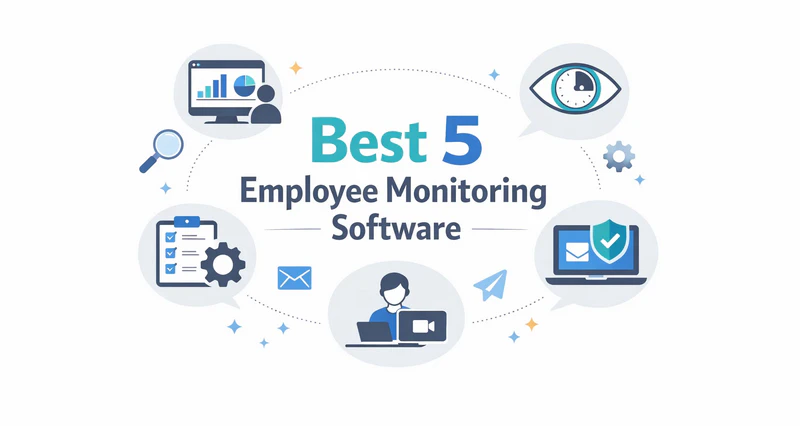
What Is Employee Monitoring Software?
Employee monitoring software refers to tools that allow organizations to track, record, and analyze employee activity on company-owned devices and networks. These tools serve multiple purposes: improving productivity, preventing insider threats, protecting sensitive data, and ensuring compliance with industry regulations such as HIPAA, GDPR, and PCI DSS.
Unlike basic time-tracking apps, enterprise-grade monitoring software can cover a broad range of activity: file operations, email content, USB transfers, print jobs, clipboard data, application usage, and web browsing—often with real-time alerts, blocking capabilities, and long-term audit trails. Some platforms also integrate data loss prevention (DLP) and encryption to actively stop data leaks, not just record them.
Which Employee Monitoring Software Is Right for You?
If you don't want to spend time understanding the features of all products, you only need to answer the following simple questions to immediately find the employee monitoring software that best suits your business out of these 5 programs.
Best Employee Monitoring Software for you: AnySecura
We matched your answers to the option that best fits your needs.
Product Features
The product description will be displayed here.
Top 5 Employee Monitoring Software in 2026
Here is a complete review of the top-rated employee monitoring software on the market. Follow this guide to choose the best fit for your business.
How We Selected These Tools
We evaluated each tool across five criteria:
- Monitoring Coverage: Does it cover the activity channels relevant to your risk profile—files, email, USB, apps, and web activity?
- Productivity & Workforce Visibility: Does it provide meaningful insight into how employees spend their time—active vs. idle periods, application usage, and work patterns—that managers can act on beyond security incidents?
- Real-Time Response: Can it block or alert on risky actions as they happen, or only log after the fact?
- Compliance Support: Does it generate audit-ready reports for relevant regulations (GDPR, HIPAA, SOX)?
- Ease of Deployment: How long does initial setup take? Is it suitable for non-security teams?
- Pricing Transparency: Are tiers clearly defined and aligned with business size?
Teramind
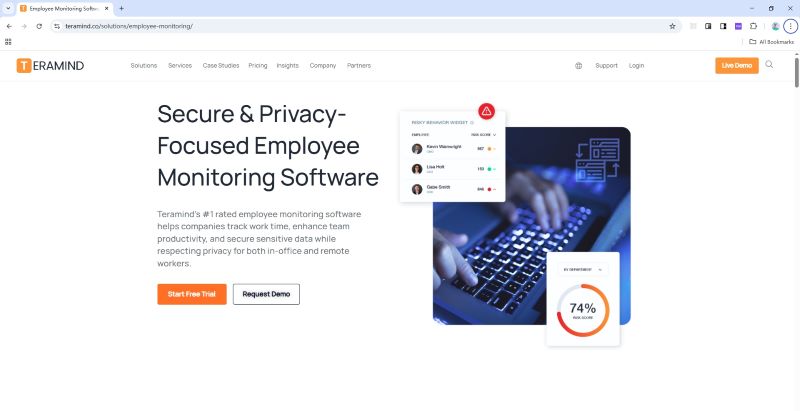
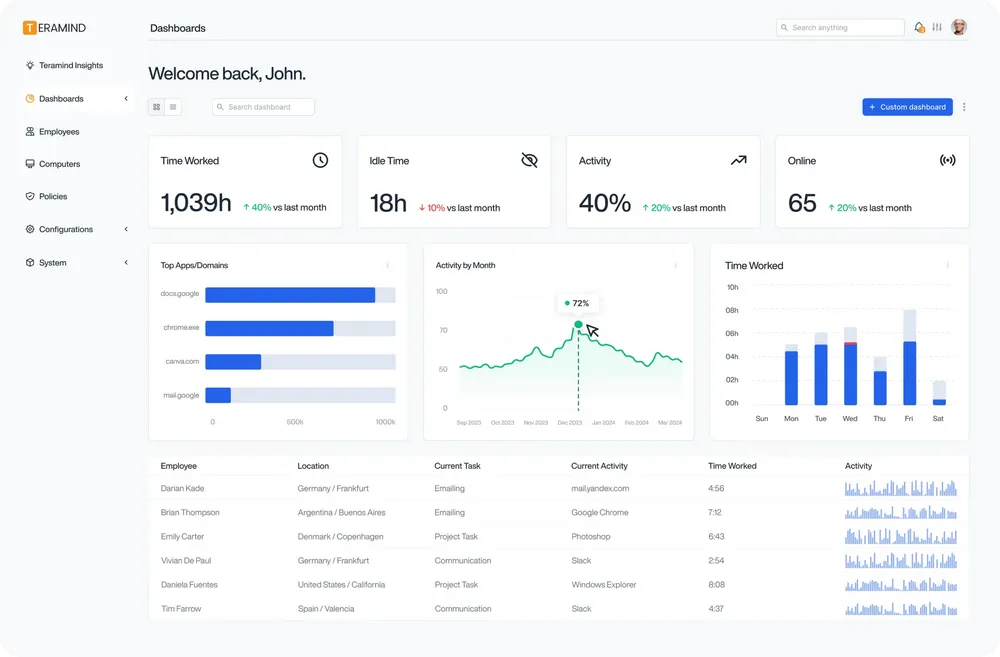
Teramind is a popular employee monitoring software known for its UAM (User Activity Monitoring) and DLP capabilities. It monitors websites, applications, file activity, emails, IM, printing, online meetings, and even geolocation, giving managers a full picture of user activity. You can also view live screens and replay historical activity for investigations. The dashboard comes with ready-made widgets like “Top Performers” and “Most Used Browsers,” making it easy to spot trends before problems grow.
The Core Value of Teramind:
- Screen & Audio Recording: Captures continuous or event-triggered video of employee screens, plus device audio (input and output). Recordings support live viewing and historical playback, enabling administrators to reconstruct exactly what happened on a device at any given time.
- Optical Character Recognition (OCR): Scans screen recordings and live views in real time to extract visible text from images. Enables keyword search within recorded sessions, useful for detecting sensitive data on screen (e.g., credit card numbers, SSNs) to support PCI DSS and HIPAA compliance. Available in the Enterprise plan.
- Website / Application / Email / Instant Message / Network Monitoring: Logs visited URLs, time-on-site, and search keywords; records app usage by name and active window title. Email monitoring (Outlook, Gmail via browser) captures sender, recipient, subject, and body content for keyword-based policy matching; IM monitoring covers Teams, Slack, and Skype, logging message content and file transfers.
- Citrix/Session Hosts Monitoring: Extends activity logging and session recording to Citrix XenApp/XenDesktop, Remote Desktop Services (RDS), and virtual desktop environments. Keystrokes, app usage, and screen recordings are captured identically to local desktop sessions—useful for organizations running ERP or financial systems in virtualized environments.
- Remote Desktop Control: Take control of remote employee computers in real-time to provide support, troubleshoot issues, or prevent data breaches and insider threats.
- RDP Session Recording: Records RDP sessions as video files with frame-by-frame playback, indexed separately from standard screen recordings for easy isolation during incident investigations. Particularly useful in environments where external vendors or IT administrators regularly access systems remotely.
- Productivity Analysis: Classifies applications and websites as productive, unproductive, or neutral based on configurable rules, then generates per-user and per-team scores over selected time ranges. Productivity data is integrated with behavioral risk signals—a user combining low productivity scores with unusual after-hours activity can be automatically flagged for review.
- Active Vs. Idle Time Logs: Records keyboard and mouse input in second-level granularity to distinguish active sessions from idle ones, with a configurable inactivity threshold. Daily reports break work time into active, idle, and away states—particularly useful for verifying remote employee hours.
- Unproductive Work Time Analysis: Aggregates time on non-work-related sites and apps into per-user and team-level reports across daily, weekly, or custom periods. Unlike the Productivity Analysis module, this view focuses specifically on loss patterns—surfacing trends like consistent mid-afternoon distraction across a team.
Hands-on Impressions
Getting started is surprisingly easy—suitable for businesses of all sizes, particularly those with compliance or security requirements. The built-in templates and compliance rules cut down on setup time. However, the dashboard initially displays over 10 widgets (e.g., "Top Performers," "Most Used Browsers," "Risk Alerts"), which can feel overwhelming for non-technical users. After hiding irrelevant widgets and customizing filter logic (e.g., filtering by department or time range), it transforms into an intuitive command center.
A standout feature is the "jump to video from event log"—clicking on a suspicious file transfer or website visit instantly pulls up the corresponding screen recording, eliminating the need to sift through hours of footage. However, since it continuously records screens, you’ll need to plan for extra storage and bandwidth.
Pricing & Best Fit
On Capterra: Starter around $168/user/year, UAM around $336/user/year, and DLP (cloud) around $384/user/year. It’s an excellent value for businesses wanting fast deployment and polished dashboards. Advanced DLP and on-premise tiers carry higher costs, making them a better fit for organizations with dedicated security teams and stricter compliance requirements. All plans require a minimum of 5 seats.
 Pros:
Pros:- Rich dashboards and detailed activity tracking
- Easy onboarding and prebuilt compliance templates
- Live monitoring and video playback for investigations
Cons:- High storage requirements for continuous recording
- Complex interface at first for non-technical users
- Advanced features come with additional costs
👍 Best for
Medium to large companies that want strong insight into user activity and need both productivity tracking and insider threat detection in one system.
AnySecura
AnySecura is a complete employee activity monitoring platform covering 12+ behavioral channels: screen recording, application and website usage, email, instant messages (18+ platforms), file operations, print jobs, clipboard, keystroke logging, USB/removable devices, network traffic, login/logout events, and hardware/software changes. Built for organizations that need both workforce visibility and data protection, it layers real-time alerts, policy enforcement, and optional transparent encryption on top of the monitoring foundation, without making security the afterthought.
The Core Value of AnySecura:
- 12+ Channel Behavioral Coverage: A single console captures screen recordings, application and website usage, email (SMTP/Exchange), instant messages across 18+ platforms (WhatsApp, Skype, LINE, ICQ, Zalo, WeChat Work, and more), file operations, print jobs, clipboard, keystroke logging, USB devices, network traffic, and login/hardware change events, a complete behavioral footprint with nothing to cross-reference from separate tools.
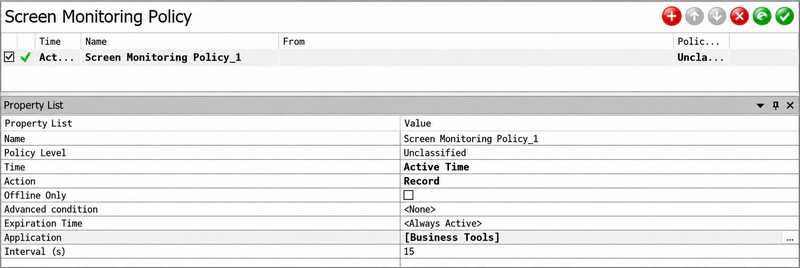
- Screen Monitoring & Lightweight Recording: View up to 16 employee screens simultaneously; historical recording stores under 5 MB per client per hour at a 15-second interval. Recording frequency can be set per application, high-risk apps (finance tools, file transfer clients) recorded more often, routine apps less, without multiplying storage costs.
- Productivity Insights with Dual Time Metrics: Application and website usage reports distinguish machine uptime from actual keyboard/mouse active time—directly surfacing "computer on, no one working" patterns that uptime-only tools miss.
- Alert-Linked Forensics: Every policy alert is logged with a precise timestamp. Administrators can jump directly from the alert record to the corresponding frame in screen history, closing the loop from "alert received" to "evidence reviewed" without manual log searches.
- Proactive Risk Alerts: The built-in risk analysis module ranks users by high/medium/low risk level, maps document derivation chains, and triggers tiered alerts based on pre-built security event rule libraries or custom-defined rules.
- Policy Enforcement & DLP Controls: Block or restrict USB devices, websites, applications, print jobs, clipboard use, and web uploads. Built-in employee approval workflow allows temporary access requests with multi-level sign-off and full audit log. Mandatory CC on outbound email provides an additional oversight layer without a separate Email DLP tool.
- Scheduled Reports & Audit Trails: Search activity by user, device, department, event type, and time range; schedule daily, weekly, or monthly report delivery for management and compliance reviews.
Hands-on Impressions
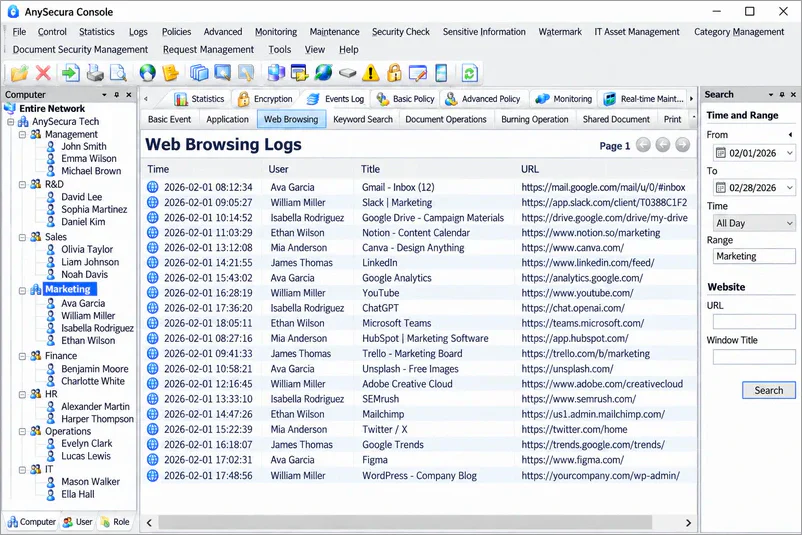
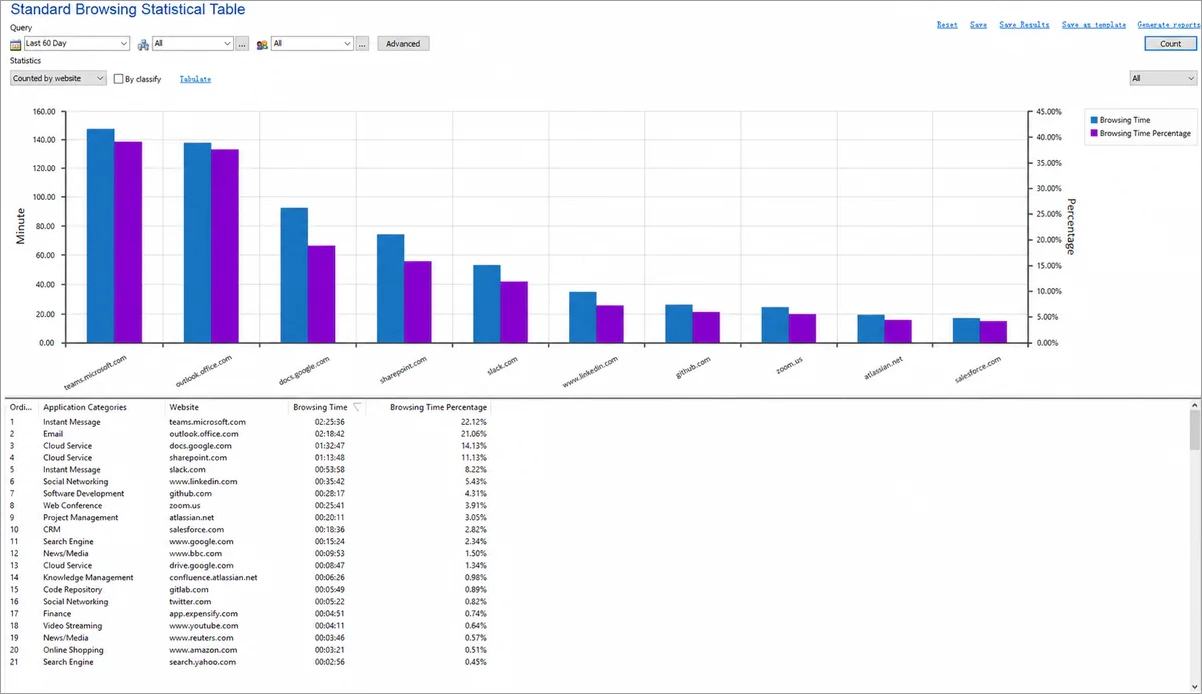
AnySecura is organized more like an investigation console than a simple employee time tracker. Website visits, application use, file operations, email, USB activity, and print events are kept in dedicated logs, with filters for user, device, department, and time to help narrow down a specific incident. This structure makes it easier to move from an alert to the supporting activity records without piecing together data from separate tools. Deployment is fast—the agent can be pushed to an entire organization in around 30 minutes via silent package install; no dedicated security team is required to get started. Managers who only need basic attendance or productivity summaries may find it more detailed than necessary, while security and compliance teams are more likely to value the additional context.
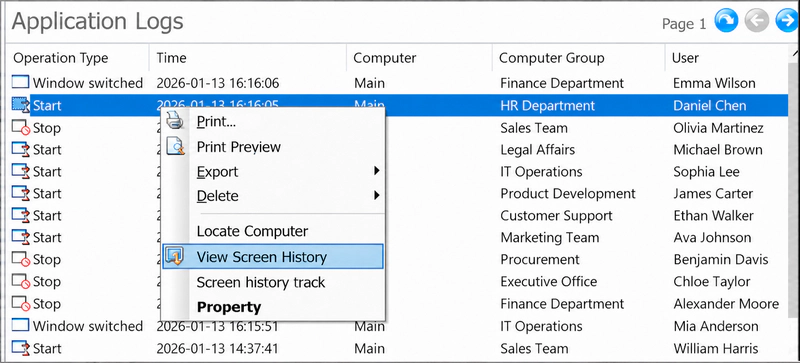
The alert-linked forensics workflow stands out in practice: when a policy alert fires, the system records the exact timestamp. Clicking into that alert lets you jump directly to the corresponding frame in screen history, reducing the inconvenience of manual searching through recordings. The custom reporting feature is equally useful: we built a dashboard to track "web browsing by department" and scheduled weekly auto-deliveries, which helped identify teams spending disproportionate time on non-work sites during core hours. The screen recording settings are flexible—you can set it to record only when specific apps (e.g., Outlook, file transfer clients) are active, and set a shorter interval for high-risk applications to get more granular coverage without multiplying storage.
While the interface is less visually polished than Teramind (fewer color-coded charts, more text-based logs), it’s highly functional: all critical data is organized in a navigation menu, making it easy to switch between monitoring, alerts, and reports. The only minor friction is the initial policy setup—configuring USB access rules and encryption exceptions requires some familiarity with IT security concepts.
Pricing & Best Fit
Three tiers: Professional at $216/user/year (full monitoring across all channels + DLP device/print/web controls), Ultimate at $336/user/year (adds sensitive content inspection, document classification, and watermarking), and Enterprise at $420/user/year (adds transparent file encryption and secure access gateway). All plans are on-premise deployments with a free trial available. For organizations that only need specific capabilities, module-based pricing is also available—allowing teams to license individual feature sets rather than committing to a full-tier plan. At Professional tier, the price is comparable to Teramind’s entry plan while providing deeper monitoring channel coverage and built-in DLP controls.
Pros:- Deep monitoring coverage in this comparison—12+ channels including 18+ IM platforms and alert-linked screen forensics
- Screen recording stores <5 MB/hr per client with per-app variable frequency, keeping storage costs manageable
- Distinguishes machine uptime from actual active time—identifies "computer on, person absent" scenarios
- DLP controls (device, print, web upload blocking) and employee approval workflows included in base plan—no upsell needed
- ~30 minutes to deploy company-wide; no dedicated security team required
Cons:- Interface is more text-log-oriented than Teramind’s visual dashboards—requires more configuration to produce manager-friendly views
- On-premise only; no cloud-hosted option for teams that prefer SaaS deployment
- Advanced features (encryption, content inspection) require higher-tier plans
👍 Best for
Organizations that need both comprehensive employee activity monitoring and data protection in a single platform—security and compliance teams that want full behavioral visibility across all channels, plus DLP controls and optional encryption, without purchasing and integrating separate tools.
Looking beyond employee monitoring? Compare seven insider threat detection tools — including Teramind, Proofpoint ITM, Cyberhaven, and AnySecura — by blocking capability, encryption, and deployment model. Learn more>>
Proofpoint Insider Threat Management (ITM)
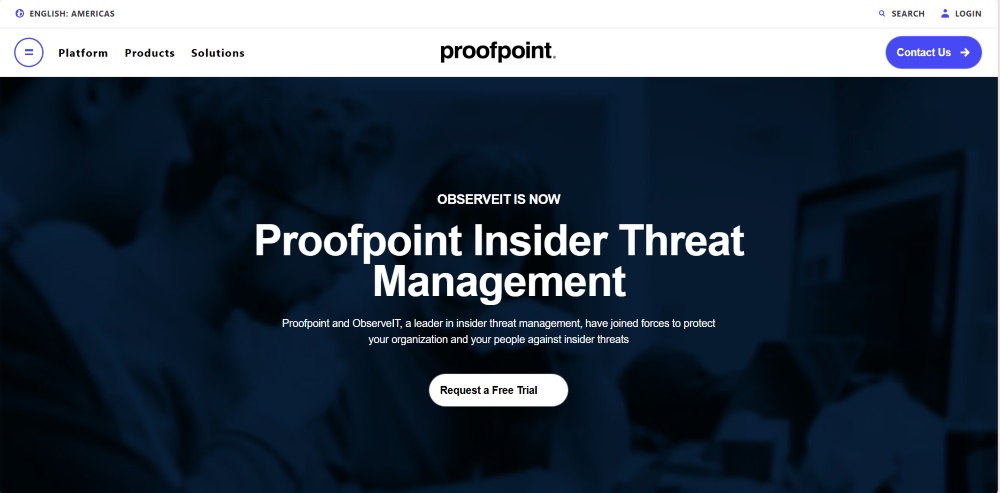
Proofpoint Insider Threat Management (ITM)—formerly ObserveIT, acquired by Proofpoint in 2019—is a powerful employee computer monitoring software that focuses on insider-risk analytics and detailed audit trails. Instead of directly blocking file actions, it monitors and analyzes user behavior to identify risk patterns. Every action, from file access to SQL commands, is logged and assigned a dynamic risk score. This approach gives security teams deep visibility into who did what and why, helping them focus on high-risk behaviors instead of drowning in logs.
The Core Value of Proofpoint ITM:
- Behavioral Monitoring: Tracks logins, file actions, app and web use, plus sensitive operations like key inputs and SQL commands across endpoints.
- Real-Time Alerts: Uses an Insider Threat Library and custom rules to flag risky activity right away and show clear on-screen warnings.
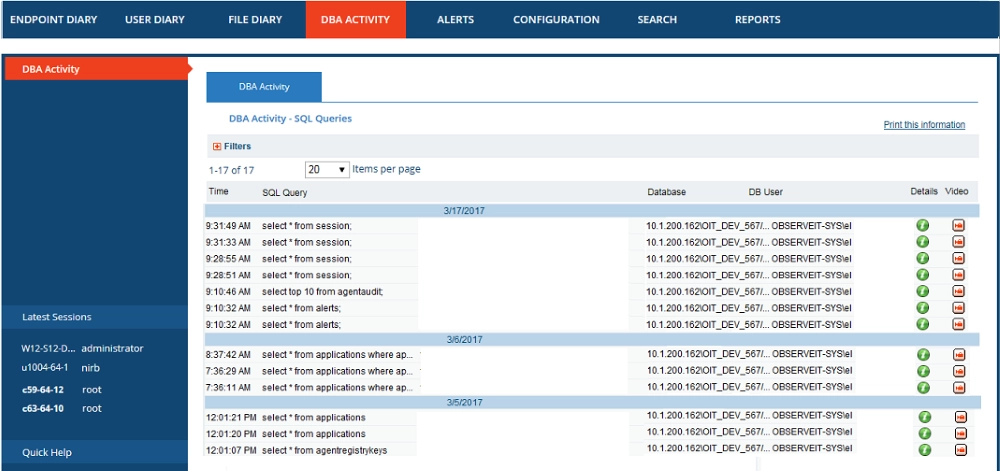
- Forensic Audit Trails: Creates detailed, time-stamped records and session captures so investigators can review what happened step by step.
- Session Replay & Screens: Supports live viewing and historical screen review to analyze incidents and coach users based on real evidence.
- Guided Policy Response: Can warn users or, on supported systems (e.g., Linux/Unix), terminate risky processes or log off a user to reduce harm.
- Compliance Reporting: Offers configurable reports and email delivery to document activity, alerts, and policy events for audits.
- Team Awareness & Training: Emphasizes risk awareness and behavior coaching, helping organizations correct issues before data loss occurs.
Hands-on Impressions
Using Proofpoint ITM feels like operating a digital forensics tool tailored for enterprise security teams. It’s designed primarily for post-incident investigations, and this focus shines through in its workflow: when a data breach is reported, you can search for the user’s activity by time, action (e.g., file download, SQL query), or risk score, and pull up a minute-by-minute audit trail with timestamped screenshots and keystroke logs.
The Insider Threat Library provides pre-built rules, which are great for teams without large security staffs. On Linux systems, the tool offers limited real-time intervention: we tested a scenario where an employee ran a suspicious script, and the system terminated the process within 3 seconds of triggering the rule. However, on Windows/macOS, it’s purely observational—you can’t block actions in real time, only log and alert. The biggest downside is the report design: most reports are table-heavy (no interactive charts), so analysis often requires manual effort and a trained eye.
Pricing & Best Fit
Proofpoint ITM has moved to a subscription model; pricing is custom and requires a direct quote from sales. Based on third-party sources, mid-market deployments typically run $25–$70/user/year, while large enterprise contracts frequently exceed $87,000/year. This puts it firmly in the high-end enterprise category, suited for governments or large corporations that require in-depth audits and forensic-grade visibility.
Pros:- Excellent for forensic investigations and risk scoring
- Comprehensive activity logs with detailed context
- Strong library of predefined insider-threat rules
Cons:- Limited real-time prevention and blocking
- Heavily data-driven and less visual interface
- High cost limits accessibility for smaller businesses
👍 Best for
Large enterprises and government organizations that need deep behavioral auditing, compliance evidence, and insider-risk analysis rather than everyday productivity tracking.
We360.ai
We360.ai is a cloud-based employee monitoring software and productivity management platform developed in India. Unlike security-focused software, it emphasizes performance visibility over surveillance. It offers time tracking, app and website classification, productivity scoring, task and project management, location tracking, and even goal setting. Its AI engine summarizes performance trends, team health, and engagement levels to help managers balance workloads efficiently.
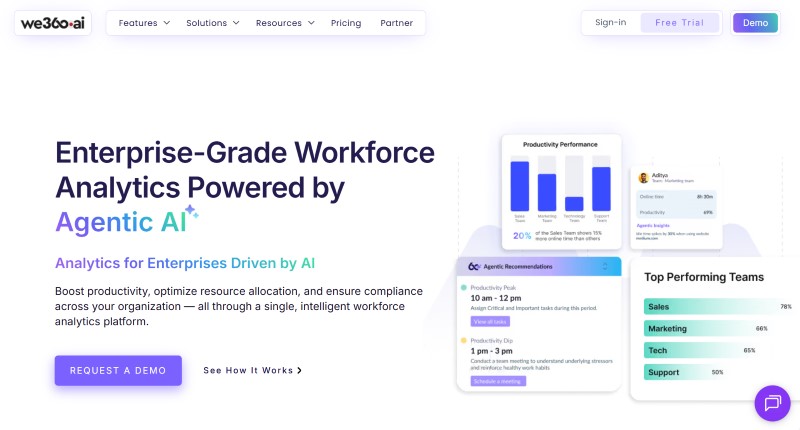
The Core Value of We360.ai:
- Application and Website Usage: Provides insights into how employees use various applications and websites during their working hours.
- Alerts: Triggers notifications for risky website or app usage, security policy violations, productivity anomalies (e.g., sudden drop in active time), and behavioral irregularities such as unauthorized application use. Alerts are delivered via email to managers in real time.
- Livestream: See what employees are working on in real time with a tile view showing current apps/URLs and live status like active, idle, or offline.
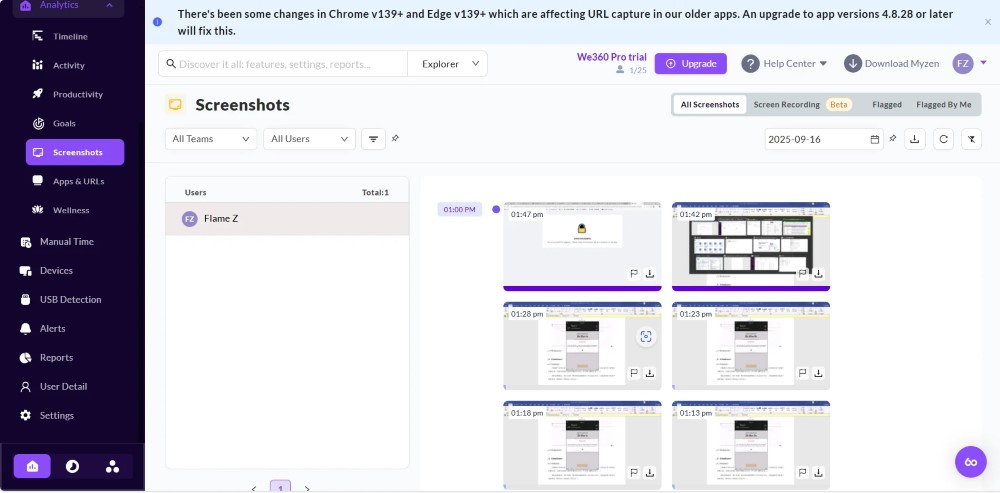
- Screen Recording: Screen Recording captures 5-min sessions (1 fps) with activity %, app/URL, clicks, and keypresses, kept for 7 days.
- Keyboard and Mouse activity: Monitor real-time keyboard and mouse activity to measure employee engagement levels and identify active, idle, or offline states.
- Domain Blocking: Restricts access to specific websites during work hours to ensure focus and prevent distractions.
- Devices: Lists all monitored endpoints by device name, OS version, last active time, and current online/idle/offline status. Supports both Windows PCs and Android mobile devices, giving visibility into mixed-device teams without requiring separate MDM software.
Hands-on Impressions
The dashboard feels friendly and intuitive, showing online time, idle time, and attendance all in one view. It’s ideal for team leads who want an overview without micromanaging. The built-in project and task modules allow assigning work, tracking progress, and managing deadlines seamlessly. However, the monitoring depth is limited for security needs: it can’t track file transfers, USB usage, or email content—only app/website time and basic keyboard/mouse activity. The blurred screenshot feature is a nice privacy touch, but it means you can’t verify if an employee is actually working on the app they’re logged into (e.g., they could have Slack open but be browsing social media in a hidden tab).
In day-to-day use, the most practically useful view is the productivity heatmap—a grid showing each employee’s activity level by hour across the week. We used it to identify that two remote team members had near-zero activity every Monday morning, which turned out to be a time zone configuration issue rather than disengagement. The AI-generated weekly summary emails (delivered automatically to managers) are well-formatted and highlight outliers without requiring manual report generation. However, when we tried to investigate a specific incident—an employee suspected of mishandling a client file—We360.ai had no record of the file itself, only that the employee had been "active in File Explorer" for 12 minutes. For any file-level investigation, you will need a separate tool.
Pricing & Best Fit
We360.ai offers a Free Plan (up to 3 users), Starter plan at around $60/user/year, and Pro plan at $84/user/year, with enterprise pricing available upon request. It’s well suited for SMBs that care more about time optimization and engagement tracking than strict compliance or insider threat prevention.
Pros:- Modern, easy-to-understand dashboards
- Includes task and project management modules
- Affordable pricing with free-tier option
Cons:- Limited in-depth monitoring for files or devices
- No strong DLP or compliance features
- Depends entirely on internet connectivity
👍 Best for
Small to mid-sized businesses focused on team productivity, attendance, and remote workforce visibility rather than strict IT governance or data security.
Spyrix
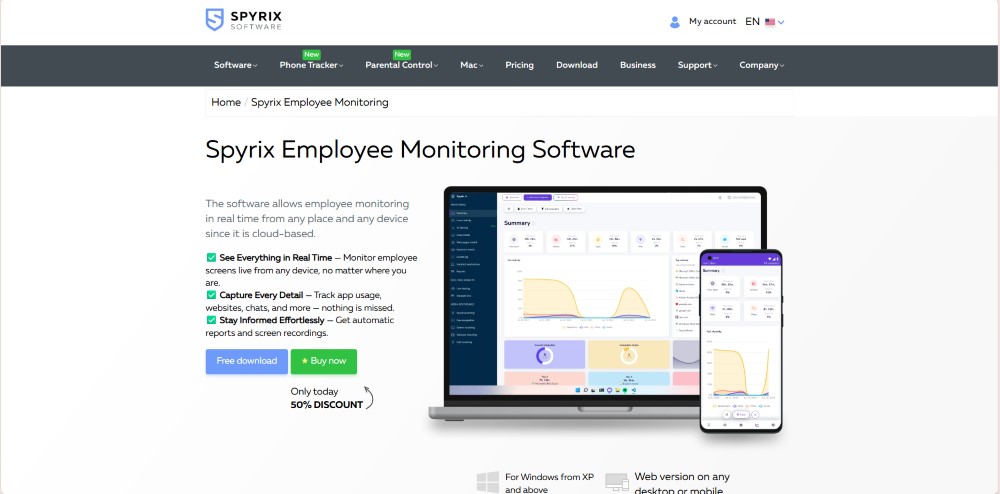
Spyrix started as a home-use and parental monitoring tool and later expanded to a business edition. It includes screen recording, keylogging, clipboard capture, and even audio or webcam monitoring. While this breadth of coverage sounds appealing, it also raises serious privacy and compliance concerns. It lacks deeper enterprise features like file auditing, workflow analysis, or data classification, so its visibility is broad but not strategic.
For a detailed head-to-head breakdown, see: AnySecura vs Spyrix Comparison 2026: Features, Pros, and Cons
The Core Value of Spyrix:
- Web Activity Monitoring: Logs full URLs visited, time spent per site, and visit frequency. Results are grouped by domain and exportable as CSV, but there is no automatic productive/unproductive classification—admins must label categories manually.
- Application Usage Tracking: Records app name, window title, and time spent per session. Note that it does not capture file names or document content accessed within those apps, so it shows what was open but not what was done.
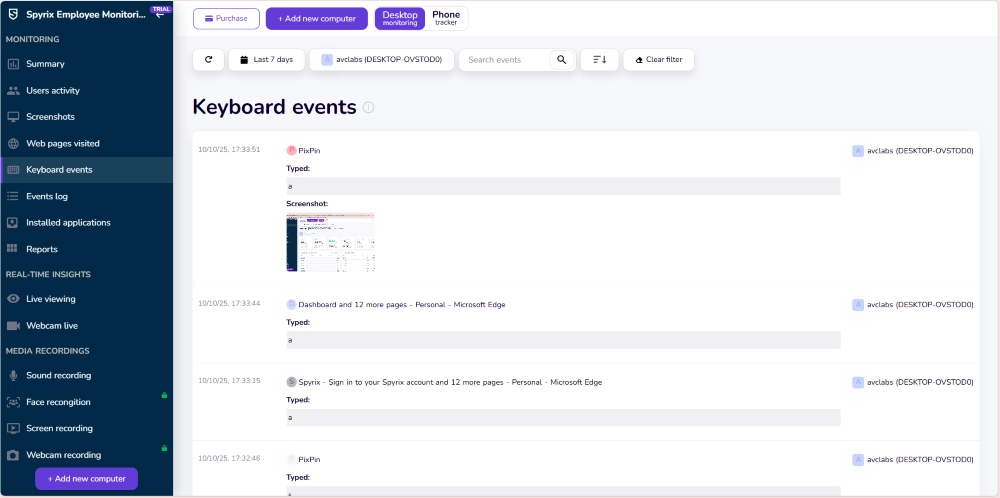
- Keystroke Logging and Clipboard Tracking: Captures every keystroke including passwords and form entries, plus all clipboard copy/paste events. This level of capture raises significant legal concerns in most jurisdictions—employee disclosure and consent are essential before enabling this feature.
- Screenshots / Screen Recording: Takes screenshots at configurable intervals—15, 30, or 60 seconds and stores them locally or on a designated remote server. There is no searchable index or timeline view—reviewing specific events means scrolling through timestamped image files manually.
- Webcam / Microphone Monitoring: Records webcam video clips and microphone audio on demand or on a schedule. Recordings are saved locally with no automatic transcription or behavioral analysis, making review time-intensive.
- Remote View and Control: Lets administrators view a monitored screen in real time and take remote control. The viewer is functional for single-device use but not built for managing large fleets—there is no multi-session dashboard or role-based access for larger teams.
- Multi-Device Support: Supports monitoring across multiple Windows and macOS machines under one account. Note that Android monitoring is offered as a separate Phone Tracker product (Standard/Pro tiers), not as an integrated feature within the core Employee Monitoring package.
- Productivity Reporting: Generates daily summaries of active time, idle time, and top apps/websites. Reports are flat tables with no charts or trend analysis; there is no scheduled report delivery or export automation.

This step-by-step remote work setup guide will show you how to build a secure remote work environment for business. Learn more>>
Hands-on Impressions
Setup is fast—deploying the agent on a single Windows machine takes under 10 minutes, and the agent runs silently in the background by default. For a home user or a manager monitoring one or two devices, this simplicity is the main appeal.
In practice, however, the volume of raw data Spyrix generates quickly becomes unmanageable without enterprise-grade tooling to process it. Keystroke logs, for example, capture everything—including passwords, personal messages, and irrelevant idle typing—with no filtering or risk scoring. To find a specific event, you must export the log and search manually, which is impractical for anything beyond a handful of devices. Screen recordings suffer the same problem: thousands of timestamped screenshots with no searchable index or event tagging.
There is also no alerting system. Unlike AnySecura or Teramind, which can notify administrators the moment a risky action occurs, Spyrix only records passively—you discover incidents after the fact, when you happen to review the logs. Equally significant is the absence of any blocking or policy enforcement capability: Spyrix cannot prevent an employee from copying files to USB, emailing sensitive data, or visiting restricted sites. It can only show you that it happened.
For a regulated business environment, these gaps are deal-breakers. But for a small business owner who wants a simple, low-cost way to check in on a few remote workers, or a parent managing a child's device, the straightforward setup and low price point make Spyrix a reasonable fit.
Pricing & Best Fit
Capterra lists its business edition at around $149/user/year. Considering the invasive data collection and limited reporting features, it’s not a strong choice for professional environments. It may be more suitable for very small teams or personal computer monitoring.
Pros:- Captures nearly every detail of user activity
- Simple setup and installation
- Offers webcam and microphone recording for full visibility
Cons:- Highly invasive, potential privacy and legal concerns
- Lacks enterprise-level analytics and dashboards
- Limited correlation between activity and productivity outcomes
👍 Best for
Home users, freelancers, or very small teams needing basic computer tracking and not subject to corporate compliance requirements.
Which Employee Monitoring Software Fits You?
1. Monitoring Depth & Compliance
- AnySecura ⭐⭐⭐⭐⭐: Widest monitoring footprint in this comparison—12+ behavioral channels covering screen recording, 18+ IM platforms, email (SMTP/Exchange including Mandatory CC), file operations, print jobs, clipboard, keystroke logging, USB devices, network traffic, and system change events. Alert-linked forensics connects every policy alert to the corresponding screen history frame for rapid evidence review. DLP controls and a risk user analysis module are included without requiring enterprise-tier upgrade.
- Teramind ⭐⭐⭐⭐: Monitors websites, applications, file activity, emails, instant messages, printing, online meetings, geolocation, and Citrix/RDP sessions. While broad in coverage, it focuses on behavioral visualization and auditing rather than encryption or watermarking. It provides blocking and audit functions but lacks AnySecura’s document-level data protection capabilities.
- Proofpoint ITM ⭐⭐⭐⭐: Focuses on insider threat analysis, logging system events, file operations, and key activities to build risk scores. Supports risk-triggered session recording—recording begins automatically when a risk threshold is crossed. Does not offer document encryption or print control; primarily designed for investigation and traceability.
- We360.ai ⭐⭐: Functions more as a productivity analytics tool, tracking time, applications, websites, and task completion. It lacks deep monitoring for files, peripherals, and communications, and is better suited for teams focusing on efficiency.
- Spyrix ⭐⭐: Emphasizes keystroke logging, clipboard capture, screenshots, webcam, and audio recording. These may be useful in home settings but raise privacy concerns in corporate environments. It doesn’t record file or email activity.
Summary: AnySecura leads in monitoring channel breadth and alert-linked forensics; Teramind and Proofpoint ITM serve behavioral analytics and insider risk; We360.ai and Spyrix are not suitable for enterprise-grade compliance or DLP.
2. Productivity Tracking & Remote Work Visibility
- We360.ai ⭐⭐⭐⭐⭐: Purpose-built for productivity management. Tracks active vs. idle time, app and website classification, productivity scoring, and work pattern trends—all in a dashboard accessible to non-technical managers. Includes built-in project and task management for remote team coordination.
- Teramind ⭐⭐⭐⭐: Strong productivity analytics—classifies apps and sites as productive or unproductive, generates per-user and team scores, and links productivity trends to behavioral risk signals. Dashboard requires some customization to surface the right metrics for non-security users.
- AnySecura ⭐⭐⭐: Covers active time, application usage, and web activity logs with scheduled reports and custom dashboards. More suited to compliance-level visibility than day-to-day team management; reporting is powerful but requires some configuration to produce manager-friendly summaries.
- Proofpoint ITM ⭐⭐: Designed primarily for post-incident investigation rather than ongoing productivity management. Rich audit data but presented in table form; requires a security analyst rather than a team manager to interpret.
- Spyrix ⭐⭐: Provides basic active/idle time and app usage summaries, with no structured productivity reporting or team-level analysis. Better suited to spot-checking individual devices than managing a distributed team.
Summary: We360.ai leads for productivity-first teams; Teramind offers strong analytics with a security overlay; AnySecura and Proofpoint ITM are better suited for security and compliance teams; Spyrix lacks the analytics depth for workforce management.
3. Real-Time Response & Automation
- AnySecura ⭐⭐⭐⭐⭐: Provides real-time blocking, automatically alerts or intercepts when employees plug in USB drives or access sensitive files. It can throttle or close non-work websites based on policy. Screen recording can be set per app and interval, stored long-term without affecting bandwidth.
- Teramind ⭐⭐⭐⭐: Offers real-time viewing and playback of user sessions. Supports real-time blocking, redirection, and user lock-out in addition to alerts and session playback—though its interface is more analysis-oriented than AnySecura's policy-enforcement model.
- Proofpoint ITM ⭐⭐⭐: Mainly used for post-event audits. On Linux, it can terminate processes or log out users, but overall real-time defense is weaker.
- We360.ai ⭐⭐: Supports real-time screen and location view, with domain blocking that auto-closes disallowed sites after prolonged use. Automation is mostly in AI-based reporting and recommendations, not active security blocking.
- Spyrix ⭐⭐: Allows real-time viewing via screen, webcam, and microphone, but lacks enterprise-grade control automation.
Summary: AnySecura provides the strongest active defense automation; Teramind is strong for visibility; others lag in proactive controls.
4. Ease of Use & Scalability
- AnySecura ⭐⭐⭐⭐: Rich features with a moderate learning curve requiring security team setup. Offers multi-language support and free trial, with modular licensing that scales with business growth.
- Teramind ⭐⭐⭐⭐: Easy to install and start, includes many templates suitable for quick SMB deployment. Interface can be dense; admins may need to customize dashboards for optimal use.
- Proofpoint ITM ⭐⭐⭐: Data presented mainly in tables; technical and best for enterprises with dedicated security teams. Deployment and usage costs are high for smaller organizations.
- We360.ai ⭐⭐⭐⭐: User-friendly interface with project management and goal-setting modules. Ideal for distributed teams; expansion comes from its SaaS and AI-based structure.
- Spyrix ⭐⭐: Very simple to use, but the interface and reports are basic, insufficient for enterprise analytics.
Summary: Teramind & We360.ai are easiest to start; AnySecura scales best for security-heavy orgs; Proofpoint ITM suits mature security teams; Spyrix is too basic.
5. Pricing & Deployment
- AnySecura ⭐⭐⭐⭐: Three tiers—Professional ($216/user/year), Ultimate ($336/user/year), Enterprise ($420/user/year)—all on-premise with a free trial. Professional includes full monitoring and DLP controls; Ultimate adds content inspection and document classification; Enterprise adds transparent encryption and secure access gateway. Competitive with Teramind's equivalent DLP tier ($384/user/year) while adding on-premise data sovereignty.
- Teramind ⭐⭐⭐⭐⭐: According to Capterra, Starter costs $168/user/year, UAM $336/user/year, and Cloud DLP $384/user/year. Available in cloud and on-premises versions. Great value for teams wanting full functionality on a budget.
- Proofpoint ITM ⭐⭐: Subscription-based with custom enterprise pricing; typically $25–$70/user/year for mid-market deployments, with large contracts often exceeding $87,000/year. Targets large enterprises and government agencies requiring forensic-grade audit trails.
- We360.ai ⭐⭐⭐⭐: Offers a free plan (up to 3 users); paid plans cost about $60–84/user/year. Affordable and scalable for small teams.
- Spyrix ⭐⭐: Around $149/user/year. Aimed at home monitoring, offering limited business value.
Summary: Teramind offers best ROI at entry level; We360.ai is budget-friendly; AnySecura provides competitive all-in-one value at Professional tier; Proofpoint ITM is costly enterprise-only; Spyrix lacks enterprise benefit.
Employee Monitoring Software Comparison Table
| Software | Deployment | File / USB / Print Monitoring | Real-Time Blocking | DLP / Encryption | Compliance Reports | Best For | Starting Price* |
|---|---|---|---|---|---|---|---|
| AnySecura | On-Premise | Full Coverage | Yes | Transparent Encryption + Watermarking | Scheduled Reports | Security & Compliance Teams, Regulated Industries | ~$216/user/year |
| Teramind | Cloud / On-Premise | Broad (no encryption) | Yes (block, redirect, lock-out) | No native encryption | Templates included | SMB to Mid-market | ~$168/user/year |
| Proofpoint ITM | On-Premise / Cloud | Audit logs (no blocking) | Linux only | No | Forensic-grade | Enterprise / Government | Custom (contact sales) |
| We360.ai | Cloud | No file/USB/print | Domain blocking only | No | Basic | SMB / Remote Teams | ~$60/user/year |
| Spyrix | On-Premise | No file/email audit | No | No | No | Home / Personal | ~$149/user/year |
*Prices sourced from Capterra and vendor websites as of September 2026; actuals vary by region, seat count, and promotions.
Bottom line: Across all four dimensions, AnySecura stands out for comprehensive protection, flexible auditing, real-time controls, and multi-language enterprise support.
FAQs about Employee Monitor Software
Q1: Is it legal to monitor employees?
It depends on your jurisdiction and company policy. In general, be transparent: disclose what you monitor, why, and how you handle data; obtain required consent. Tools heavy on keylogging or A/V capture (e.g., Spyrix) should be used with extreme caution.

Learn how to monitor employee internet usage legally and ethically and best practices.Learn more>>
Q2: Can these tools effectively track remote or WFH teams?
Yes. Most offer cross-platform agents and cloud consoles. Teramind supports geolocation and remote sessions; AnySecura supports on-prem with offline recording and enforcement; We360.ai includes mobile visibility for presence/location. Always balance monitoring with culture and privacy.
Q3: Can I try before I buy?
Typically yes. Teramind has a 14-day trial; We360.ai offers a free plan; AnySecura offers a 30- to 90-day free trial; Proofpoint ITM provides demos or tailored trials; Spyrix also has a trial. During trials, stress-test monitoring scope, alert response, report output, and employee acceptance.
Q4: What's the difference between employee monitoring software and DLP software?
Employee monitoring software tracks behavior (activity logs, screenshots, time tracking), while DLP (Data Loss Prevention) software focuses on protecting data from leaving the organization. Some tools like AnySecura combine both: monitoring user behavior and blocking unauthorized data transfers in real time. If you need both capabilities, look for a platform that integrates monitoring with DLP rather than purchasing two separate tools.
Q5: How does employee monitoring software impact employee trust?
Transparency is key. Monitoring programs that are disclosed to employees and linked to clear business policies—protecting company data, ensuring compliance, supporting investigations—are generally accepted. Covert monitoring (especially keylogging or webcam recording without disclosure) creates legal exposure in most jurisdictions and damages morale. Tools like AnySecura support a privacy-conscious deployment where monitoring focuses on data actions rather than personal behavior.
Q6: How should I handle employee privacy concerns when deploying monitoring software?
Start with a written policy that clearly defines what is monitored, why, how data is stored, and who can access it—then communicate this to employees before deployment. Differentiate between monitoring data actions (file transfers, USB usage, print jobs) versus personal behavior (keylogging, webcam recording): the former is generally accepted and legally defensible; the latter creates risk in most jurisdictions. Consider a tiered approach—baseline monitoring for all employees with deeper logging only for high-risk roles or triggered by specific events. Tools like AnySecura support this by allowing administrators to set monitoring scope per department or user group, reducing blanket surveillance while maintaining security coverage.
Q7: What should I look for when buying employee monitoring software?
Key evaluation criteria include: (1) monitoring scope—does it cover all channels relevant to your risk profile? (2) deployment model—cloud vs. on-premise and its data residency implications; (3) real-time vs. post-event detection; (4) compliance reporting capabilities; (5) employee privacy controls; and (6) integration with your existing SIEM or IT infrastructure.
Conclusion
Choosing the right employee monitoring software is not just about tracking activity, it’s about finding a balance between visibility, control, and trust . Whether your goal is to improve productivity, ensure compliance, or prevent data leaks, the right tool can make your organization more secure and efficient.
We hope this guide helps you discover the platform that best matches your company’s goals and scale. If your organization handles sensitive data and needs a solution that goes beyond activity logging—one that actively prevents data leaks through encryption, watermarking, and real-time controls—AnySecura is worth evaluating. For teams focused primarily on productivity analytics and attendance, We360.ai offers a more accessible starting point. The right choice depends on your industry, compliance requirements, and security maturity.
Take control of your organization’s data security and performance today and experience hands-on protection for your business.